


New Customer Care Portal of BSNL
After waiting for a long time BSNL finally launched a Customer Care Portal for its users to know the details about various services which it is availing. By creating a new account in this portal one can access many services that are New Connections, Additional Services, Register Complaints etc
- New Connections: You can register a new telephone connection
- Additional Services: If you are an existing customer you can benefit with additional services.
- Register Complaints: You can register complain. Also, can follow by tracking it.
- View and Pay Bill Online: More secure and easy way to pay bills
- FAQs and Solution Search: Find answers to your queries or problems
- Product Catalog: Check out more latest products introducing by BSNL
….
How to Register on BSNL’s Website?
We are providing here with the steps by which you can easily register on BSNL’s website http://selfcare.ndc.bsnl.co.in. 1 . Call at 0294-2523009. 2. Ask for a 10-digit “Customer ID” tell the person your phone no. 3. Go to http://selfcare.ndc.bsnl.co.in4. Look for “Existing BSNL Customer? Click Here to Register and Avail Online Services.”
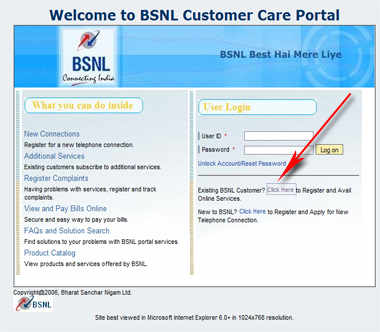 5. Enter your 10-digit Customer ID and then click on continue.
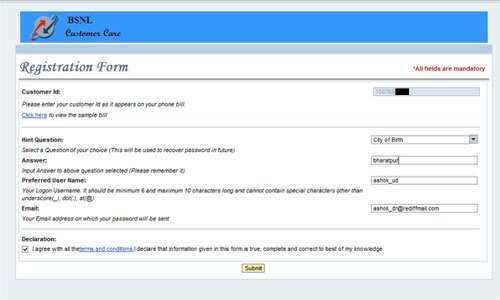
……….
To join us on Facebook Click Here and Subscribe to UdaipurTimes Broadcast channels on GoogleNews | Telegram | Signal