

OnePlus Nord 6, Nord CE 6 Get ColorOS 17 Update in India: Check New AI Features, Build Numbers and How to Install
OnePlus has started rolling out the permanent ColorOS 17 update for the Nord 6 and Nord CE 6 in India. The update brings a redesigned interface, new AI features, improved system performance and several other changes. Check the new build numbers, features and steps to install the update.

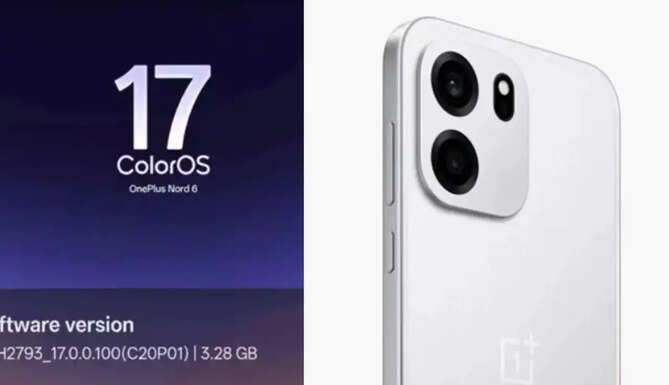
November 20, 2026: OnePlus has started rolling out new operating system updates to multiple smartphones ahead of schedule. The company has now begun the permanent ColorOS 17 update rollout for the OnePlus Nord 6 and Nord CE 6 in India. Based on Android 17, the software update brings a new design, improved system performance and several AI-based features. OnePlus has confirmed the rollout through separate announcements on its community forum.
However, the update will not reach all users at once. It is being released through a phased over-the-air (OTA) rollout. Reports suggest that users enrolled in the Release Candidate programme may receive the update in the initial phase.
OnePlus Nord 6 and Nord CE 6 get different ColorOS 17 build numbers
The ColorOS 17 update for the OnePlus Nord 6 comes with firmware version CPH2793_17.0.0.100(EX01). Meanwhile, Nord CE 6 users are receiving the update with build number CPH2805_17.0.0.101(EX01).
A Nord 6 user has reported that the update size is around 3.28GB. However, the download size may vary between users. OnePlus has also released separate changelogs for both smartphones, highlighting the new features and improvements included in the update.
New lock screen design and Quick Settings panel
The ColorOS 17 update introduces a new Fluid Design interface for the OnePlus Nord 6 and Nord CE 6. The way notifications appear on the lock screen has also changed, with a new shrinking animation. The lock screen clock can now automatically adjust its size based on the number and content of notifications.
The Quick Settings panel has also received a redesigned layout. The update adds a new rotation animation for apps running in landscape mode. In addition, several system apps now feature an updated interface.
AI features and system performance improvements
The new update introduces several features, including AI Suggest, Live Alerts and AI Highlights. OnePlus has also added support for more languages to its AI-based translation system. A new Translate app has also been included in the update.
To improve overall performance, OnePlus has used its Enhanced Laminar Flow Engine. The company has also improved background app management to make the system run more smoothly, according to the changelog.
ColorOS 17 also introduces a new feature called OSee, which works with the system's AI Vision technology. Other improvements include an upgraded document scanning system and an enhanced AI Hyper Clarity algorithm.
Another notable addition allows users to view photos and videos captured on certain third-party devices directly through the Photos app. This feature can make managing media files across different devices easier.
How to install the ColorOS 17 update on OnePlus Nord 6 and Nord CE 6
Eligible OnePlus Nord 6 and Nord CE 6 users will receive an OTA notification when the update becomes available for their devices. Users can also manually check for the update through their phone's settings.
To do this, go to Settings > System > System Updates > Download and Install. If the update is available, users can download and install it from there. Since this is a large software update, it is advisable to keep enough storage space available and connect to a stable Wi-Fi network before starting the installation.
ColorOS 17 was released last October with new system-level AI features and software improvements. The operating system arrived on the OnePlus 15 last month. With the permanent update now reaching the two Nord series smartphones, other compatible devices may also receive the new software in the coming weeks.
